How to sell Bitcoin in Nigeria: the steps and the checks
Selling bitcoin in Nigeria is mostly a matter of process. You pick a venue you trust, complete its checks, compare the quote against a chart, place the order, then move the naira to your own bank account. This guide follows that order and names no platform, so you can apply it whether you use a peer-to-peer marketplace or an exchange.
Decide what you are selling and where
Start with what you actually hold. Coins sitting in your own wallet, coins already on a platform, and a contract that only tracks the price are three different things, and each is closed in a different way.
Selling to an exchange means placing an order on a platform where you already have an account. It is the most mechanical route: the platform matches your order, and the naira sits in your account there until you withdraw it. Selling through a peer-to-peer marketplace means agreeing a trade with another person, often paid by local bank transfer, with the platform holding the coins until payment is confirmed.
Closing a broker contract is not selling bitcoin at all. A contract for difference follows the price without any coin changing hands, so you exit the position rather than transfer an asset. Leverage cuts both ways, and losses can mount quickly.
Speed and risk move together. An exchange order can fill in moments but leaves you relying on the platform's systems; a peer-to-peer trade can take longer because a real person must send the money and you must confirm it.
In most cases you must first move coins from your wallet to the platform, which means a network fee and a wait for confirmations. Send a small test amount first, and check that the address and network match before sending the rest. If you plan to buy bitcoin in Nigeria later, the same wallet habits apply.
Verification before the first sale
Many platforms require an identity check before you can withdraw naira. Expect to submit a government-issued ID, a selfie, and sometimes proof of address. The platform reviews these, and approval is not instant.
The bank account you withdraw to normally has to carry your own name. A platform may reject a transfer to a friend's account or a third-party account, even if that person is helping you. Confirm the name on your bank profile matches your ID before you start the process.
Do this early, not on the day you need the money. Verification can take a while, and a pending review can block a withdrawal you have already arranged. Complete the checks while your coins are still sitting quietly, so the sale itself is the only task left.
Do not borrow or rent a verified account. Using someone else's KYC to move your money puts your funds in their name, and you have little recourse if they keep the naira. It also ties your transaction to a stranger's identity, which you cannot undo.
Keep your PIN, OTP and SMS codes to yourself. A platform will not ask you to share them, and anyone who does is not helping you verify anything.
Check the rate against the chart
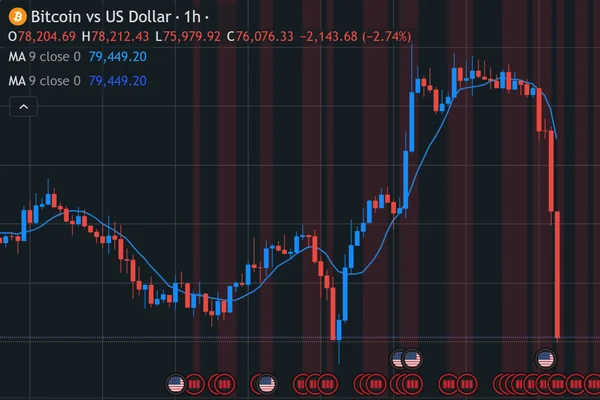
Before you accept a quote, look at the market price for yourself. This site has no price of its own: the dollar price chart comes from a TradingView widget, and its data can lag the live market, so treat it as a reference rather than a promise. The naira page builds its figure from two charts, one for Bitcoin in USD and one for the dollar against the naira, and links to the official rate published by the Central Bank of Nigeria.
A platform's buy quote will sit below the chart price. That gap covers its margin and the fees it charges, and the spread is how the venue earns on the trade. Compare the total naira you would actually receive after fees are deducted, not the headline rate on the screen.
Look at more than one timeframe. A single day can look calm while the wider week tells a different story, and the reverse is also true. Switching the chart between them costs nothing and gives you a fairer sense of where the price sits.
Do not let a post or a message push you into selling in a hurry. Screenshots of a rate can be old, edited, or simply wrong, and urgency is a common pressure tactic. Check the chart yourself, confirm the figure on your own platform, then decide at your own pace.
Selling on an exchange
Once your account is verified, selling begins with a transfer. Copy the deposit address from the platform and compare it character by character before you send anything; a single wrong digit sends coins into a void with no recovery. Make sure the network you select on your wallet matches the one the platform expects, then send a small test amount first. Wait for it to arrive and show as credited before moving the rest.
Bitcoin blocks arrive about every ten minutes, and a platform usually waits for several confirmations before it treats a deposit as final. That wait is normal, not a fault. The confirmation screen shows how many blocks have passed since your transaction was included; if it sits at zero for a long stretch, check the transaction on a block explorer rather than sending again.
With the coins credited, you place a sell order. A market order fills at whatever price buyers are paying at that moment, so you get speed but no say over the rate. A limit order lets you name your price and waits until someone meets it, which may take minutes or may not happen at all if the market moves away. Check the receiving address again if you ever move coins back out.
Large orders can fill in parts, so one order may produce several trades at slightly different prices. The platform shows each fill, and the total naira from the sale then sits in your account balance, ready for withdrawal.
Selling peer-to-peer: protect yourself
A peer-to-peer sale puts you face to face with another person, and the platform's escrow is what stands between you and a loss. When you open a sell order, the coins leave your wallet and sit locked in escrow, not in the buyer's hands. The buyer then sends naira by bank transfer, and you release the coins once you have confirmed the money. Until you release, the coins cannot be moved by the buyer.
The release is the whole risk, so confirm payment in your own bank app before you touch it. Open the app yourself and look for the credit in your balance. A screenshot proves nothing, since images are easy to edit, and a transfer alert that arrives by SMS can be faked or forwarded. If the buyer says the money has left their side, that is not the same as money in your account.
Watch for payment coming from an account in a different name from the buyer's. A third party paying on someone's behalf can later dispute the transfer, and your bank may reverse it, leaving you with coins already released. Ask the buyer to pay from an account that carries their own name, and treat any mismatch as a reason to pause.
Keep the conversation inside the platform's order chat. A buyer who asks you to move to a messaging app is taking the trade off the record, where the platform cannot see what was agreed. The order chat is your evidence if a dispute is opened, so leave the key details there.
Release only after the money is visible and the name matches. If anything feels wrong, do not release; open a dispute and let the platform review the order.
Getting naira into your bank account
Withdrawing is the last step, and the naira should land in a bank account that carries your own name. Use the account tied to your own KYC details; a mismatch can invite a hold while checks are done.
Processing times vary. A withdrawal may pass automated checks, or a reviewer may pick it out for a closer look, so do not schedule a payment on the assumption that money will arrive at a set hour. Start the withdrawal with time to spare if the naira is needed for something specific.
Fees may apply, and they can be deducted before the naira reaches you. Read the withdrawal screen carefully and note the amount you will actually receive, not just the balance shown. Keep that figure for your records.
A bank account the bank has flagged can hold up a credit even after the platform has sent it. If the money does not appear, check your bank app first, then the platform's withdrawal record, before raising it with either side.
Save the bank app notification and the platform's transaction record. They show the amount, the date and the reference, and they settle most queries quickly.
Larger amounts can prompt extra questions about where the coins came from. Keep your purchase records and transfer history to hand, and answer plainly if your bank asks.
Records, costs and your own accounts
Keep a simple record of every sale: the date, the amount of Bitcoin sold, the rate you got, and the naira that reached your bank. Save the platform's confirmation and your bank app notification alongside it. These are the papers you will want if a query arises later, and they take seconds to keep at the time.
The gap between the quote you saw and the balance in your account is made up of several parts. There is the spread between buy and sell prices, the trading fee the platform charges, the network fee for moving coins, and any bank charge on the incoming transfer. Each one is separate, and together they explain why the final figure is lower than the headline rate. Our guide to Bitcoin fees sets out how each part works.
Those records do more than answer a bank. They let you work out your true proceeds, compare one sale with another, and complete your own accounts without guesswork. A running note of dates, amounts and references is enough.
Rules and platform terms can change, so check current official notices before you sell rather than relying on what you were told months ago. Confirm the details on your own platform and keep the confirmation.
Warning signs when selling
A buyer who offers above the market rate is a warning sign; the gap may be the bait. Urgency works the same way, because a seller rushed off the order chat has no time to confirm the credit in their own bank app. Slow the trade down and check the balance yourself.
Overpayment brings its own trick: the buyer sends more than agreed, then asks you to return the difference to a different account. The original transfer can later be reversed, leaving you short. Refuse the arrangement and let the platform handle any refund.
Anyone asking for a “verification fee” before a sale is taking money from you, not buying coins. Treat offers posted on social media as unverified until the platform's escrow shows the order.
Your wallet recovery phrase is the key to the coins, so no genuine buyer needs it. A request to install a remote-access app is the same attack by another route: it hands control of your phone and your banking app to a stranger.
If any of this appears, stop the trade. Keep the chat and payment records, then report the account to the platform and tell your bank about any transfer you have already made.
More guides
 Bitcoin wallets explained: custody, keys and backupsA bitcoin wallet does not hold coins the way a purse holds cash. It holds the keys that let you move coins…
 What a Bitcoin address is and how to use one safelyA bitcoin address is a string of characters that tells the network where to send coins, a bit like an account…
 Bitcoin mining explained: what it is and why it is not free moneyBitcoin mining is the work that records payments on the network and brings new coins into existence. It is not a…
Read next: Bitcoin wallets explained: custody, keys and backups · Coins and charts · Prices